
Give teachers control. Keep students on task.
Deep classroom management expertise built over more than two decades. Real-time screen visibility, lock, blank, message, restrict, Quick Question and remote assistance, across Chromebooks, Windows, macOS and iOS.
Built for teachers. Managed by IT. Controlled by your trust.
Since 2001
Education technology heritage
Chromebook, Windows, macOS, iOS
cross-platform coverage
No IT training required
for teachers
IT-controlled
permissions and delegation
What is Senso Classroom Management?
School classroom management grounded in more than two decades of education technology
Senso Classroom Management gives teachers real-time visibility of every student device in their class and the ability to act on what they see, lock screens, push a message, restrict to a specific website, run a Quick Question comprehension check or share their screen, all from a single toolbar.
Unlike classroom management tools built on top of existing platforms, Senso has developed and refined classroom management for more than two decades. IT teams configure which features each teacher can access. Multi-school role delegation allows trust IT administrators, school IT admins and class teachers to each have their own view and permissions.
Live monitoring
See every screen. Act on what you see.
Live thumbnail view
Every student device visible at a glance from a single panel, no walking the room required.
Individual screen zoom
Click any thumbnail to see the full screen. Identify exactly what a student is working on.
Lock and blank
Lock screens with a message or blank displays instantly to redirect attention.
Mute and sound monitoring
See which devices are making noise. Mute any or all with one action.
Teaching tools
Teach, question, collaborate.
Broadcast and screen share
Push your screen to every student device instantly. No projector or HDMI adapter needed.
Quick Question
Send a yes/no or multiple-choice comprehension check to the class and see responses in real time.
Website and app launch
Open a specific site or application on every device simultaneously, guided learning without student detours.
IT restriction controls
Block or allow websites and applications for the duration of the lesson, without involving IT.
Files and support
Send, collect, support.
Send File
Push any file to selected students or the whole class. No shared drive setup, no email.
Collect Files
Collect work from the class into an organised teacher folder, labelled by student.
Live Chat
Private two-way conversation between teacher and student without leaving the room.
Remote Assistance
Take control of a student screen to provide support directly, visible to the student.
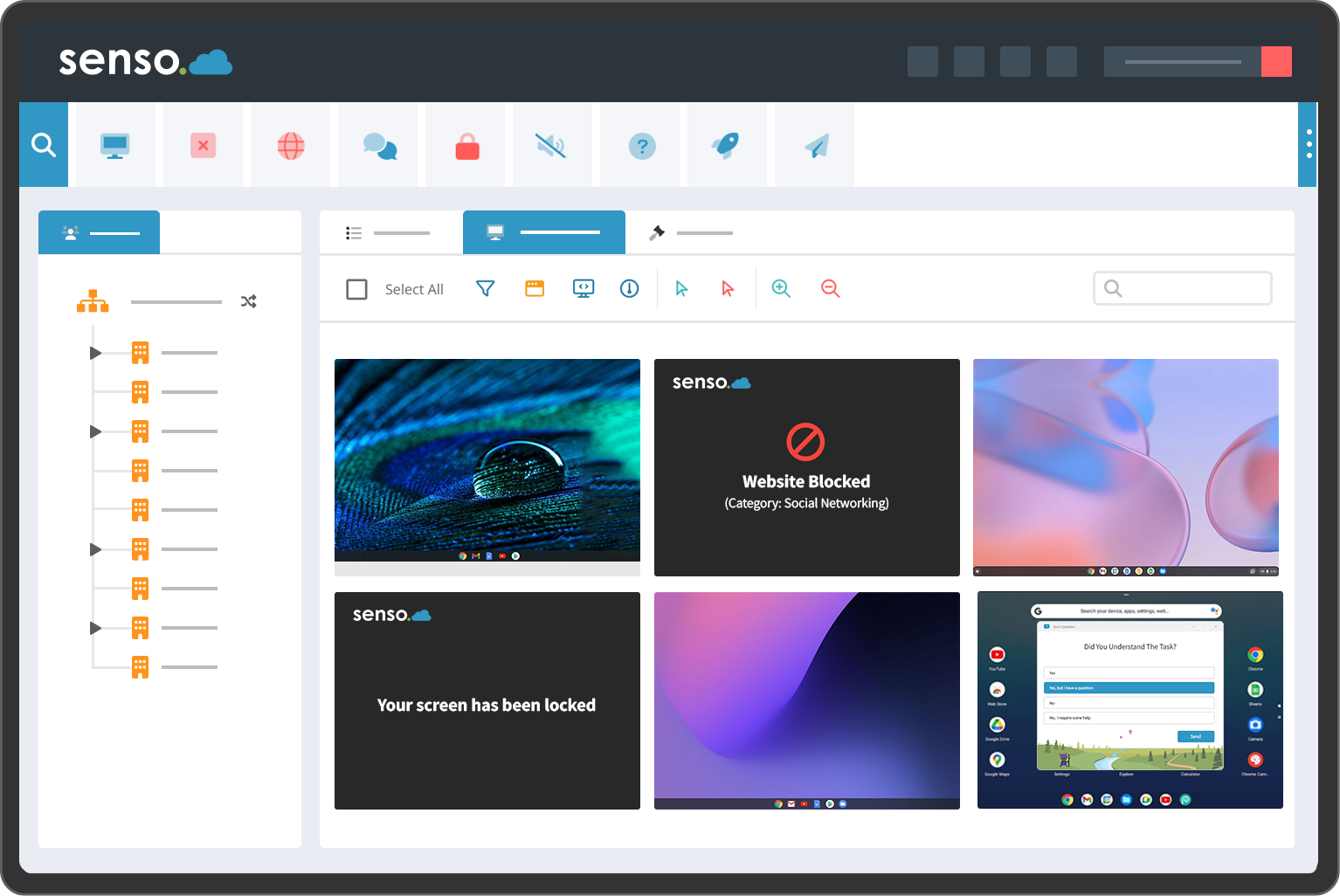
Real product interface
What teachers see
Real Senso interface · Thumbnail view of student screens · Toolbar visible at top
Benefits for teachers and IT teams
See every screen instantly
Live thumbnail view of every student device in your class, no walking the room required.
Keep students on task
Lock all screens to get attention, blank displays for focus, or restrict to a specific website for the task at hand.
Quick Question
Send a comprehension check to the whole class. See who has understood before you move on.
Share your screen
Push your screen to all student devices in one click, no projector required.
Message and support
Send a message to a student or the whole class. Open a remote assistance session without leaving the front of the room.
No technical knowledge required
Open Senso, see your class. The toolbar is designed for teachers, not IT professionals.
Centralised permissions
IT controls which teachers can use which features. Enable lock, restrict messaging, or limit monitoring to specific cohorts, all from the central admin console.
Cross-platform coverage
Chromebook, Windows, macOS and iOS. One deployment, one management console, one policy framework across every device type.
Multi-school role delegation
Trust IT administrators, school IT admins and class teachers each have their own permissions and visibility.
Integrations with your existing stack
Microsoft Entra ID, Google Classroom, Microsoft Teams and ClassLink integrations, where current. Contact Senso to confirm current availability.
Classroom and IT in one platform
Classroom management, safeguarding, filtering and IT operations all run on the same platform, agent and identity foundation.
Audit and reporting
Full audit trail of classroom sessions, policy changes and access across all schools.
IT administration
IT sets the policy. Teachers work within it.
Senso gives IT administrators a centralised permission console to determine exactly which classroom features each teacher role can access. Enable screen monitoring and locking for all teachers; restrict remote assistance to IT staff; limit website controls to heads of year. Policy is enforced automatically when teachers open Senso.
Substitute teacher access is handled without IT involvement. When a cover teacher opens a class, Senso applies the correct policy for that school and role automatically.
Multi-school trusts can delegate administration: trust IT sets the master policy, school IT admins customise within it, and teachers see only what they are permitted to use. Exam configurations can be locked centrally for assessment periods.
Collect Files
Collect work from the whole class, without email or shared drives
Collect Files lets teachers request and receive files from selected students or an entire class in one organised location. Work arrives in a teacher-accessible folder, labelled by student, without the usual friction of email attachments, shared-drive administration or asking students to submit through a learning platform.
Teachers can collect at the end of a lesson, during a timed task, or as part of an exam or assessment session. Collected files stay associated with the student and the session, making review straightforward.
Collect from selected students or whole class
Files organised by student automatically
Works alongside Send File and Live Chat
Senso Scenes
Reusable classroom and exam configurations
Senso Scenes let teachers and IT teams save a named set of classroom rules, website restrictions, application policies, lock state, permitted tools, and apply the entire configuration in one click. A "Year 11 Exam" scene applies the right controls instantly; a "Reading lesson" scene reopens approved sites and lifts restrictions.
IT teams configure which scenes are available and which settings teachers can adjust. Scenes reduce the chance of teachers applying incorrect settings under time pressure, and give IT a consistent baseline for assessment periods.
- Save and name any combination of classroom controls as a Scene
- Apply a complete set of rules in one click
- Exam mode: lock browsers, restrict applications, apply message
- Reading mode: approved sites only, no social or gaming access
- IT-managed scene library with teacher-adjustable parameters
- Consistent policy across all classrooms and substitute teachers
Complete capability reference
Everything Senso Class includes
Integration availability and platform support subject to product version and region. Contact Senso to confirm.
Trusted by schools across the UK and internationally
Trusted by more than 12,000 schools across 30 countries
Read customer reviewsPlatform support
Classroom Management platform coverage
| Platform | Live view | Lock / blank | Message | Remote assist |
|---|---|---|---|---|
| Windows (managed) | Supported | Supported | Supported | Supported |
| ChromeOS (managed) | Supported | Supported | Supported | Limited |
| macOS (managed) | Supported | Limited | Supported | Supported |
| iOS (managed) | Supported | Limited | Supported | Not supported |
Limited = partial feature set. Contact Senso for the full verified support matrix and specific OS version requirements.
Classroom Management, frequently asked questions
See Senso Classroom Management in action
Book a demonstration for your teachers and IT team. See thumbnail view, Quick Question and IT permissions in a real school context.